App Kit / Dev Console
Dev Console
Ask for a change in plain words. An agent works your repo, a verifier drives it in a real browser, and you ship it — from one page in your own app.
- 15console views
- 25.1 sask → pull request, measured
- 3rungs: confirm · verify · autopilot
- you clickthe default
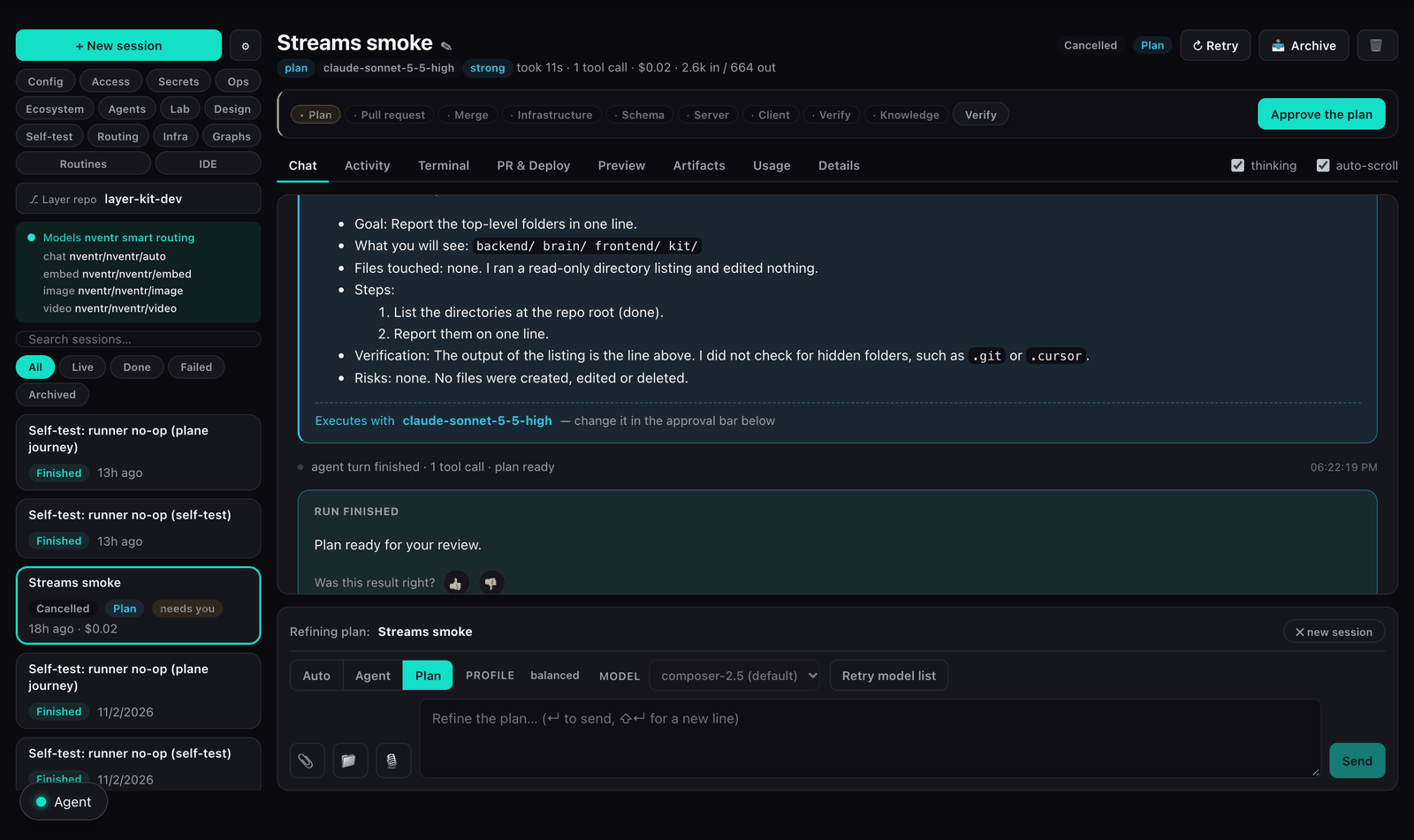
The real console on the kit's own dev instance: a plan back for approval, the Ship strip above it, the fifteen views on the left.
What it is
App Kit is the foundation: a URL, a database, and a layer repo that is yours. Dev Console is the product on that foundation. At /dev a team asks for a change, reads the plan, reviews the diff, opens a preview, and deploys — frontend, backend, or rules — to UAT, then promotes to production. The loop stays in one console.
The agent works the layer repo only. The kit you rent stays read-only. A browser workspace is there if you want to edit by hand. Pipeline design is still nQube, and a workflow write is still agentOS. This console changes your application and ships it, under your review.
How far it goes on its own is one setting. Confirm: every step is your click. Verify: agents open pull requests by themselves, and independent verifier agents plus a judge from another model family review each one before you ship. Autopilot: a green review ships. The default is confirm.
Who it is for
A team that rented an instance because they are building an app, and wants the change loop — plan, diff, preview, deploy — inside that instance.
Where you get it
App Kit, at /dev. Platform Team does not include an instance, a layer repo, or this console.
- App Kit$149 · 8 runs a month included
- Kit Business$349 · 40 runs a month included
- Kit Siteshared host, no instance
- Platform plansno instance, no layer repo
In 90 seconds — one change end to end
The whole loop is one session on one page. Every step below is a real step in the console; the times are the ones we measured, not the ones we hope for.
- 01
Ask
Type it, say it, or paste a screenshot of the page that is wrong. Attach files or a whole folder. Auto mode reads the size of the ask: feature-sized gets a plan, a label change goes straight to work.
Sessions · chat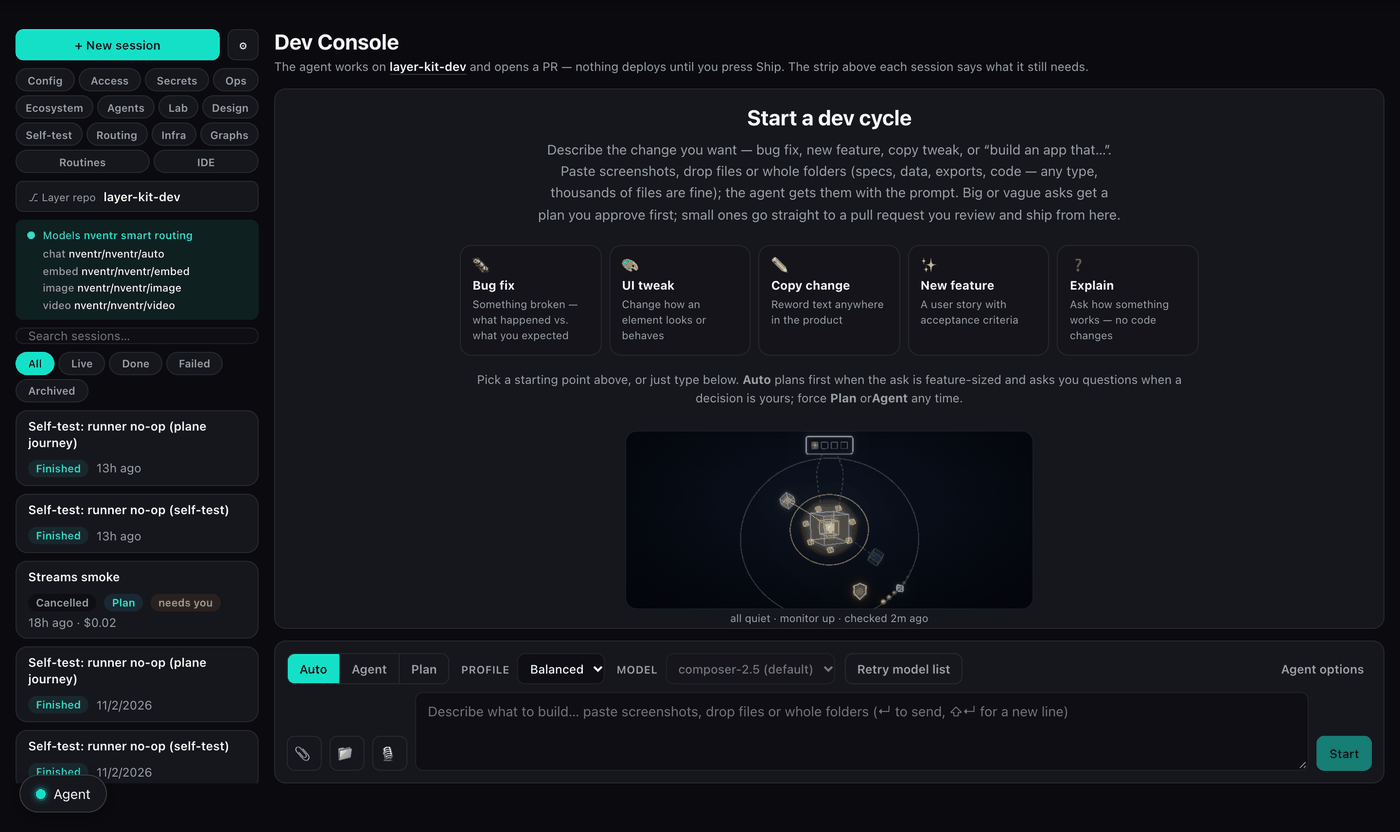
Start a dev cycle: five starting points, the composer, Auto · Agent · Plan, the profile and model. - 02
Plan, with questions
A plan comes back with the decisions that are yours, as questions. Answer them in the card and approve. The agent starts from the plan, not from a guess.
Sessions · plan card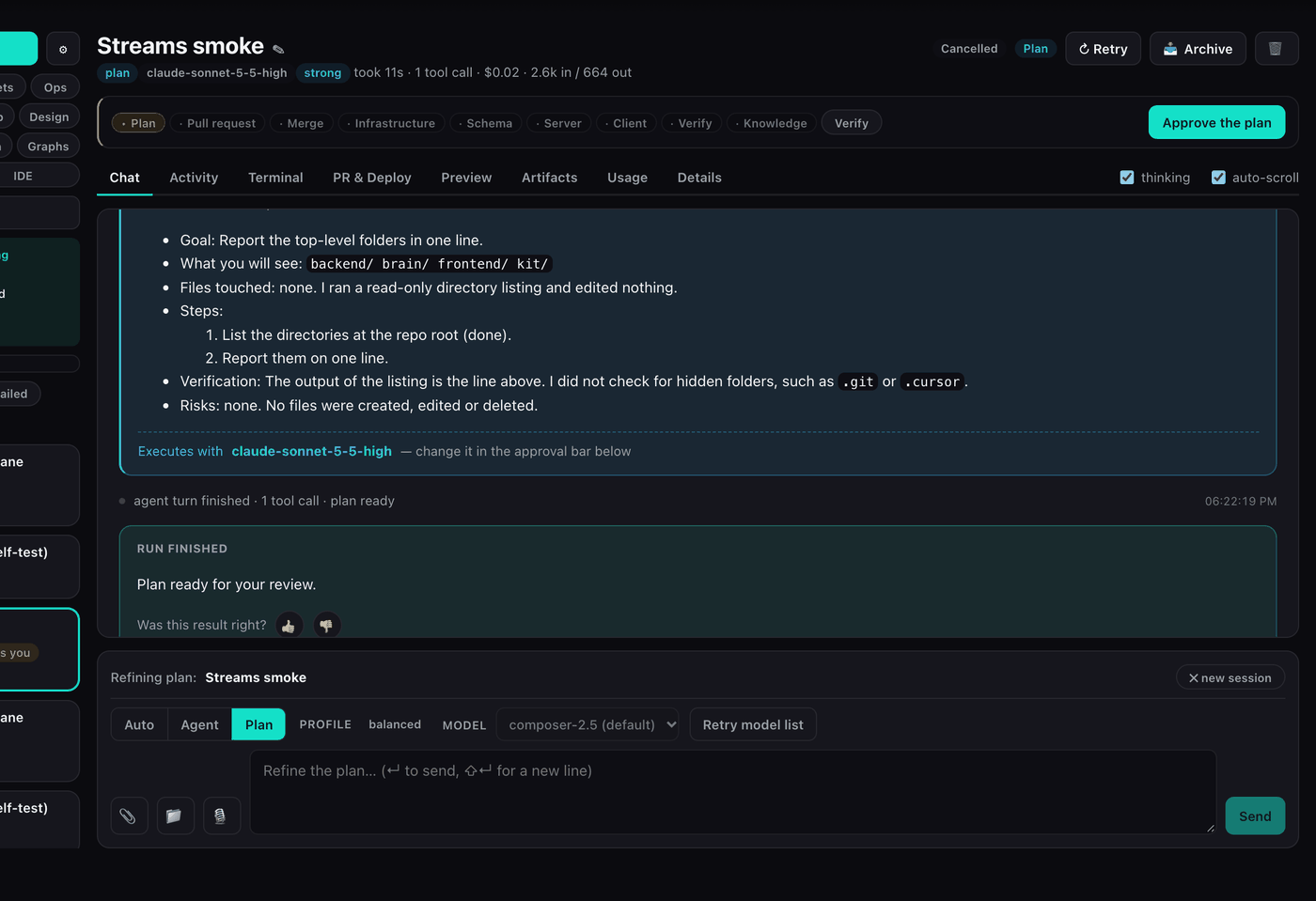
A plan back for review — goal, what you will see, files touched, steps, risks — with the model it will execute on and the Approve button. - 03
Diff and preview
The pull request opens on your layer repo with a reviewable diff and a preview channel per PR. You read what changed and click through the running change before anything merges.
Session · PR & Deploy · Preview - 04
Prove it
A verifier agent opens the preview, drives the change in a real browser and pins pass or fail to that exact commit, screenshots attached. A newer push makes the verdict stale, never passing.
Session · Activity · verdict - 05
Ship
One strip computes the next step: merge · schema · server · client · verify · knowledge. UAT is the landing zone. Production is a promote you make on purpose, and a failed production deploy rolls back once inside 30 minutes.
Ship strip
The strip above every session: plan · pull request · merge · infrastructure · schema · server · client · verify · knowledge · verify. The lit step is the next one.
What you can do
Seven groups. Each item names the view it lives in and the plan it comes with. Everything here is in the kit today; nothing is a roadmap.
Ask
Get the request into the agent with everything it needs.
Chat, voice, phone
Type, talk, or ask from the phone posture. Web push reaches you when a session needs a person or a ship lands.
Attach anything
Screenshots pasted from the page, files, whole folders as data packages: up to 5,000 files and 2 GiB per package, 200 MiB per file.
Element picker and console context
Point at the element on the page; the agent gets its selector plus a scrubbed console and network trace from the moment it broke.
Nine conversation profiles
Balanced, Economy, Quality, Design, Explain, Review, Refactor, Test and Ops set the routing and the brief for the turn.
Memory and project brain
Repo memory, your preferences and the project brain are carried into every prompt, with the top lessons for the ask retrieved first.
Five starting points
Bug fix, UI tweak, Copy change, New feature, Explain. Each asks for the facts the agent needs before it starts.
Plan
Big asks become a plan you approve; small ones become the change.
Auto, Plan or Agent
Auto decides from the ask. Force a plan or a direct change any time.
Questions in the plan
Decisions that are yours come back as questions in the plan card, not as assumptions in the code.
Stories from App Builder
What the studio handed over — concept, stories, screens — with a Build button per story and a mark on what is built or shipped here.
Smart routing
Three tiers — bulk, strong, frontier — chosen per request; frontier capped at 25% of the month; a ledger of what each ask cost.
Prove
A verdict pinned to a commit, not a green log line.
Verifier agents
A verifier drives the change on the preview in a real browser and reports pass or fail against that exact commit, screenshots attached. Default cap: 25 minutes.
Inner loop
A red pre-push check or a failed verdict buys the agent up to three fix turns inside 30 minutes; it stops early when a turn changes nothing.
Review graph
Two independent verifiers and a judge from a different model family review one pull request; the merge waits for green at that head.
Self-test suite
The instance derives its own suite from routes, entities, tools and synced design screens, and shows pass or fail per case.
Lab reports
Browser-test reports of this app from the control plane’s Lab, read next to the sessions that fix them.
Ship
One strip, one next action, UAT first.
The Ship strip
Plan → PR → merge → infra → schema → server → client → verify → knowledge. The strip computes which of those this change needs and one button runs them.
Three targets
Frontend, backend and rules deploy separately. Production is a promote; by default only an admin can make it.
Preview channels
One preview per pull request, live before the merge, gone after.
Protected paths
Project identity, the task definition, CI and provisioning scripts cannot be touched by an agent PR without an admin override.
Post-deploy verify
Health, the live bundle hash, the public layer routes and a self-test kick run after every deploy; a stalled deploy shows Retry after 8 minutes.
Operate
The same page runs the instance.
Live config
Settings the backend re-reads within a minute — no deploy.
Access
Who can sign in and what they can do: admin, product, tester, waitlist.
Write-only secrets
Paste KEY=value lines; they are mirrored to the UAT twin and never shown again.
Health, logs, costs
Health, logs and service events per environment; estimated against billed cost per cloud resource.
Blueprints
Add-ons the agent can provision from the infrastructure map, with the cost beside each.
Command view
The live picture of this app: services, monitor, security, the UAT twin and the control plane.
Autonomy
Work that starts without you, inside a budget.
Graphs of sessions
Fan a task list out to parallel workers, or race model families on one ask and let a judge pick. Up to 8 nodes and 120 minutes per graph.
Routines
A failing self-test, a thumbs-down, a brain note or a report from the control plane each open one session — at most 6 a day, one fix per cause, 12-hour cooldown.
The gardener
A weekly routine that walks the week’s merged changes with fresh eyes — duplicated helpers, dead switches, docs that drifted from the code — and files them as weeds. It finds; it fixes nothing until you approve the plan.
The trust ladder
Confirm, verify, autopilot. One setting; the default is confirm.
Where it runs
Your repo, your host, your model endpoint if you want one.
Your layer repo
GitHub, Gitea or CodeCommit. The kit you rent stays read-only; the agent’s writes land in the layer.
Agent runtime
A Cursor cloud agent, a warm pool, or the sovereign runner on your own instance pointed at your own model endpoint.
A browser IDE
A full Eclipse Theia workspace on the repo when you want to edit by hand: idle 60 minutes, 10 hours max, 5 at a time. Listen datasets mount read-only.
Managed or yours
The managed host is included. Your cloud or on-prem keeps the license and drops the host meters.
How far it goes on its own
How far the console goes on its own is one setting. Each rung keeps everything the rung below it had.

- 1
Confirmdefault
Every step is your click.
- Routines plan only
- Reviews are optional
- A person ships
- Production needs an admin
- 2
Verify
Agents open pull requests; proof gates the merge.
- Routines open sessions and PRs
- Verifier verdict required at the head
- Review graph on request
- A person still ships
- 3
Autopilot
A green review ships to UAT.
- Finished sessions ship to UAT as their creator
- Production stays a promote
- Same budgets, same protected paths
- Every action in the audit trail
Setting: config/app dev.autonomy. Default confirm. The budgets above it — runs per day, cooldowns, protected paths — apply on every rung.
A fix, then a deploy
Synthetic example. Not a customer.
You ask for the invoice form to hold anything over $10,000. The agent plans the change against the layer repo and returns a diff. You read it. A preview runs the form. A verifier agent opens that preview, enters $12,000, and reports pass against that exact commit, screenshot attached. You merge and deploy the frontend to UAT. Production is a separate promote. The kit image you rent is untouched. The pipeline that posts invoices, if you have one, is still an nQube graph — this deploy did not create it.
A week with it
Synthetic week. Not a customer; the screens and settings are real.
A founder with one app, one instance, and no engineer on payroll.
- Monday
Pastes a screenshot of the invoice form and asks for a hold on anything over $10,000. Auto plans; two questions come back. Answers, approves. 25 seconds later a pull request; the verifier enters $12,000 on the preview and passes.
- Tuesday
Ships Monday’s PR to UAT from the strip. Opens the Routing view to see what the week has cost so far — the typo fixes ran on the bulk tier.
- Wednesday
Asks for a customer export, Economy profile. Points the element picker at the table. Reads the diff on the phone at lunch, approves the merge from there.
- Thursday
Promotes to production. The post-deploy verify checks health, the bundle hash and the public routes; the self-test suite goes green.
- Friday
The gardener filed two weeds from the week’s merges, and a routine opened one session for a failing self-test case overnight. Reads that PR over coffee; the verifier already passed it.
What changes when you have it
Your repo, not the kit
The agent’s writes land in the layer. The rented foundation stays read-only.
A diff before anything ships
Nothing from the agent merges unseen, and nothing deploys until you say so.
Proof, not a green log line
A verifier drives the change in a real browser and pins its verdict to the commit, screenshots attached. A newer push makes it stale, never passing.
UAT, then production
Frontend, backend, and rules are separate targets. Production is a promote, not the first click.
What it costs at your volume
A run is one agent session, including the workers, judges and routine sessions a graph or routine opens; verifier passes ride along. The plan fee includes a monthly allowance.
Solo founder, a change or two a week
Kit $149 includes 8 runs. Eight sessions in the month: nothing past the fee.
Small team, three changes a day
Kit Business $349 includes 40 runs. Sixty sessions: 20 past the allowance at $1.50.
Verify rung on, routines working the backlog
Kit Business. Ninety sessions, including the ones routines opened: 50 past the allowance.
Model tokens: hosted model credits come with an allowance on every Kit plan; past it you top up a prepaid balance, or bring your own key for $0. Host meters are $0 when you host.
Limits and defaults
The defaults a fresh instance runs with. Each is a live setting on the Config view, not a ceiling.
| What | Default | Where it is set |
|---|---|---|
| Dev Console runs included | 8 / mo on Kit · 40 / mo on Kit Business | plan |
| Attachments per package | 5,000 files · 2 GiB · 200 MiB per file · 20 images inline · 40 documents extracted | dev.attachments |
| Verifier turn | 25 min | dev.verify.maxMinutes |
| Inner loop | 3 fix turns · 30 min · follow-up verify on | dev.loop |
| Graphs | 8 nodes · 120 min · 2 review verifiers | dev.graph |
| Routines | 6 / day · 12 h cooldown · 2 opened per tick | dev.routines |
| Autonomy | confirm | dev.autonomy |
| Ship | confirm · UAT first · verify on · Retry after 8 min stall | dev.ship |
| Frontier share | 25% of the month’s routed sessions | dev.routing.frontierSharePct |
| Protected paths | project.env · backend/task-def.json · .github/ · scripts/provision | dev.protectedPaths |
| Production deploy | admin only | dev.prodDeployAdminOnly |
| IDE workspace | idle 60 min · 10 h max · 5 at a time | dev.ide |
What you need
What a first session needs. The instance brings the rest.
- A Kit instance — the claim stands one up with a layer repo in it
- A git host for that repo: GitHub, Gitea or CodeCommit
- A model: nventr routing by default, or your own key or endpoint
- A person with the internal claim to click Ship
Compared with the usual way
Mechanism against mechanism. No vendor names; the shapes are what differ.
| The usual way | Here |
|---|---|
| An IDE agent on a laptop; the repo, the preview and the deploy are three other tools | One page in the app itself: ask, diff, preview, verdict, ship |
| A green CI log is the proof | A verifier drives the change in a real browser; the verdict is pinned to the commit with screenshots |
| The agent can write anywhere, including the infrastructure | The rented kit is read-only; protected paths need an admin; production is a promote |
| One model, one price, for every ask | Three tiers routed per request, frontier capped, a ledger per ask |
| Autonomy is a flag you cannot see from the outside | Three rungs, one setting, default confirm; routines budgeted per day with a cooldown |
| The operations console is a different product with a different login | Config, access, secrets, health, costs, self-test and infra are views on the same page |
Measured
Numbers from our own instances, with the source. We publish nothing we have not measured.
- 25.1 sask → branch, edit, push, pull request
A follow-up on the same branch: 28 s.
measured 2026-10-10 · kit smoke-runner on nventr's lab instance (sovereign runner) · status polled every 5 s - 320 sproduction deploy, all three targets
Rules, backend and frontend in one ship.
deploys/Kbak01jfAo3vRwg7zmOL on stack-lab-1 · prod · done - 6.3 sa service restarted by the fleet
After 2 consecutive down reports; a failed production deploy rolls back once inside 30 min.
measured 2026-10-08 · instanceHealth/stack-lab-1/remediations · audit instance.selfHeal · host-logs/self-heal-1791495733854
Questions people ask
Is this nventr Agent or agentOS?
Neither. The agent here edits a repository and you deploy that change. nventr Agent talks on a page. agentOS commits a workflow write. Do not expect this screen to compile an iOS binary or to post a journal entry.
Which plan includes it?
App Kit ($149) and Kit Business ($349). Kit Site has no instance and no Dev Console; Platform Team does not include an instance, a layer repo, or this console.
What exactly is a run?
One agent session. The workers, judges and routine sessions a graph or routine opens each count as a run; verifier passes ride along with the session they verify.
Can the agent break my infrastructure?
The kit image you rent is read-only. Project identity, the task definition, CI and provisioning scripts are protected paths an agent PR cannot touch without an admin override. Production deploys are admin-only by default.
Does it work with my own git host and model?
GitHub, Gitea and CodeCommit for the repo. For the model: nventr smart routing by default, your own key, or the sovereign runner pointed at your own endpoint.
What happens when I am away?
Web push reaches your phone when a session needs a person or a ship lands or fails. The phone posture lets you read a diff and approve a merge from there. On confirm, nothing ships without you.
Is any of this a preview?
No. Every view and capability on this page is in the kit today. The only synthetic thing here is the week, which is labelled.
Build it on an instance
App Kit is the instance — large files, heavy jobs, health checks on every deploy, updates that stay out of your layer. Dev Console is how you change that layer.